 EN
EN Etsy Listing Video Guide: Create High-Converting Videos Fast

An Etsy listing video is a short product video shown on your listing page on Etsy, designed to showcase your product in action and give buyers a clearer, more engaging view than images alone. It plays an important role in increasing clicks, trust, and conversions, especially in competitive niches. In this guide, you’ll learn how to create high-converting listing videos quickly and effectively to boost your views and sales.
Table of Contents
- Why Etsy Listing Videos Matter for Sales
- Etsy Listing Video Requirements (2026 Updated)
- How to Add a Video to Etsy Listing
- What Makes a High-Converting Etsy Listing Video?
- Common Mistakes to Avoid
- 5 Types of Etsy Listing Videos That Convert
- The Fastest Way to Create Etsy Listing Videos (AI Method)
- FAQ
- Final Words
Why Etsy Listing Videos Matter for Sales
Listing videos on Etsy play a key role in improving how customers understand, trust, and engage with your products, which ultimately impacts sales performance.
Better Product Understanding
Videos help customers see how a product looks and functions in real life, rather than relying only on static images. This makes it easier for buyers to understand details such as size, texture, and usage, reducing uncertainty before purchase.
Stronger Customer Trust
A real product video feels more authentic and transparent compared to static images alone. It helps create a more professional impression of your shop and builds trust with potential buyers.When customers can see a product in motion, they are more confident in its quality and functionality, which reduces hesitation during the buying process.
Better Listing Performance
Higher engagement from videos, such as improved CTR and conversion rates, can send positive signals to Etsy’s algorithm, which may indirectly improve your listing’s visibility and ranking over time.
Etsy Listing Video Requirements (2026 Updated)
Before uploading a video to your listing on Etsy, it’s important to understand the latest technical requirements. Following these rules ensures your video displays correctly across desktop and mobile, and avoids upload or playback issues.
Length
Etsy listing videos are typically short-form, with a recommended length of 3–15 seconds. The goal is not storytelling, but quick visual communication, showing your product clearly, highlighting key details, and capturing attention within the first few seconds.
Video Size
Your video file must be under 100 MB, and each listing can include only one video.
Resolution
Etsy recommends uploading videos with a resolution of 1920 × 1080 px (1080p or higher). This ensures better clarity and smoother playback, especially on mobile devices.
Aspect Ration
Videos are displayed in a 16:9 aspect ratio, and may be automatically adjusted to around 1280 × 720 px during playback depending on the device.
Format
The platform supports multiple file types including MP4, MOV, FLV, AAC, AVI, 3GP, and MPEG.
No Audio
All Etsy listing videos are muted by default, and audio is not supported for playback. This means your video should rely entirely on strong visuals, clear product presentation, and motion to communicate value without sound.
How to Add a Video to Etsy Listing
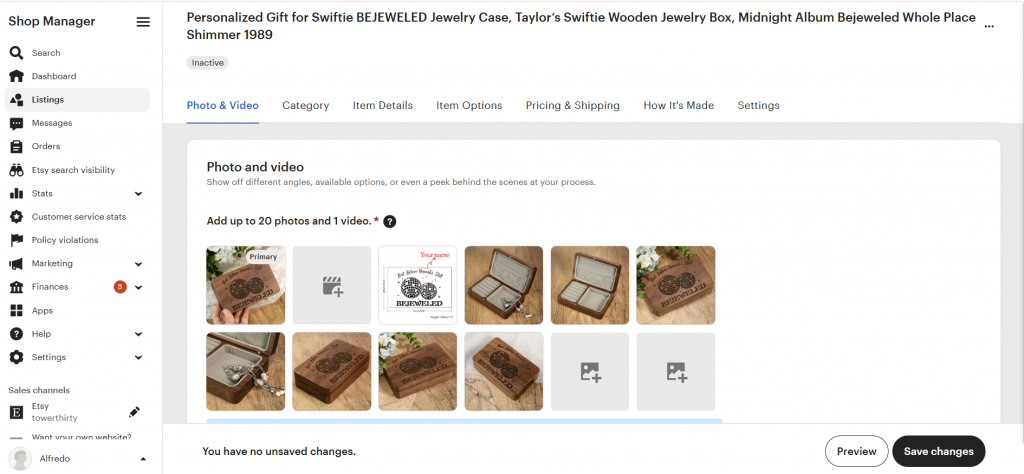
To add a video to a listing on Etsy.com:
- On Etsy.com, select the Shop Manager icon.
- Select Listings.
- Choose the listing you’d like to add a video to.
- In the About section, locate Photos and video.
- Select the blank video icon.
- Choose the short listing video you would like to add.
To add a video to a listing in the Etsy Seller app:
- In the Etsy Seller app, select Listings.
- Choose the listing you'd like to add a video to.
- Select Listing to see the listing details.
- Either select the plus sign under Photo and video or select View all then Add a video.
- Choose the short listing video you would like to add.
What Makes a High-Converting Etsy Listing Video?
Not all videos perform the same. A high-converting listing video on Etsy focuses on clarity and real product value, helping shoppers quickly understand why your item is worth buying.
Use Etsy’s Search Bar
Etsy’s search bar is one of the simplest yet most powerful tools for keyword research. When you start typing a product-related phrase, Etsy automatically suggests popular search terms based on real buyer behavior. These suggestions reflect what customers are actively searching for, making them a great source of high-intent keywords.
Show the Product in Use
Instead of only showing your product from different angles, demonstrate how it’s actually used. Whether it’s someone wearing, holding, or interacting with the item, real-life context helps buyers visualize ownership. This makes the product feel more tangible and reduces uncertainty, especially for functional or lifestyle items.
Highlight Key Features Quickly
You only have a few seconds to capture attention, so focus on your product’s most important selling points right away. Use the first 2–3 seconds to showcase what makes your item unique, such as a special function, material, or result. Avoid slow intros and get straight to the value.
Embrace Clarity and Creativity
While creativity can make your video more engaging, clarity should always come first. Buyers should immediately understand what the product is and what it does. Simple, clean shots often perform better than overly edited or complex videos. You can still use creative angles or transitions, but only when they support the message and make the product easier to understand.
Use Natural Lighting & Clean Backgrounds
Good lighting and a simple background can significantly improve how your product is perceived. Natural light helps show true colors and details, while a clean, uncluttered background keeps the focus on the product. This not only makes your video look more professional but also builds trust with potential buyers.
Common Mistakes to Avoid
Small mistakes can significantly reduce the effectiveness of Etsy listing videos. Avoid these common issues to ensure your video actually improves performance on Etsy rather than hurting it.
Lack of Focus
A common mistake is trying to show too many things at once without a clear priority. If your video doesn’t highlight a main selling point, viewers may feel confused or lose interest. Focus on one core message or feature to make your video more impactful and easier to understand.
Poor Lighting
Bad lighting can make your product look unappealing or even low quality. Dark, blurry, or uneven lighting hides important details and reduces trust.
Unstable Footage or Blurry Visuals
Shaky camera movement or out-of-focus shots can make your video look unprofessional and reduce buyer trust. Viewers may struggle to see product details clearly, which can hurt conversions. Use a tripod or keep your hands steady while filming, and ensure your product stays in sharp focus throughout the video.
No “Dynamic Value”
Some sellers simply turn product photos into a slideshow without adding real motion or context. This doesn’t provide any new information compared to images and fails to take advantage of video. Instead, use movement, interaction, or real-life scenarios to create a true “dynamic” experience that adds value beyond static photos.
5 Types of Etsy Listing Videos That Convert
Here are five proven types of videos that consistently drive higher engagement and conversions.
Product Demo
A product demo shows exactly how your item works in real life. This is one of the most effective formats because it removes uncertainty and helps buyers quickly understand functionality, usability, and benefits.
Before / After Comparison
This format is especially powerful for products that deliver visible results, such as beauty, cleaning, or organization items. Showing a clear transformation helps demonstrate value instantly and creates a strong visual impact.
Behind-the-Scenes (Handmade Process)
Perfect for handmade or custom products, this type of video highlights the creation process. It adds authenticity, tells a story, and helps buyers appreciate the craftsmanship behind your product, often increasing perceived value.
Quick Showcase (360° View)
A fast, clean rotation or multi-angle showcase gives buyers a complete view of the product. This works well for items where appearance, detail, and design are key selling points, such as jewelry, decor, or accessories.
UGC / Real People Showcase
User-generated content or videos featuring real people using the product can build strong trust. Seeing how the product looks in everyday use makes it more relatable and helps potential buyers imagine themselves using it. This type of video works especially well for print-on demand apparel (t-shirts, hoodies, sweatshirts).
The Fastest Way to Create Etsy Listing Videos (AI Method)
Creating listing videos for Etsy can be time-consuming, especially if you don’t have experience in filming or video editing. If you don’t have enough time to shoot videos or strong editing skills, using AI tools to automatically generate listing videos is a much faster and easier solution.
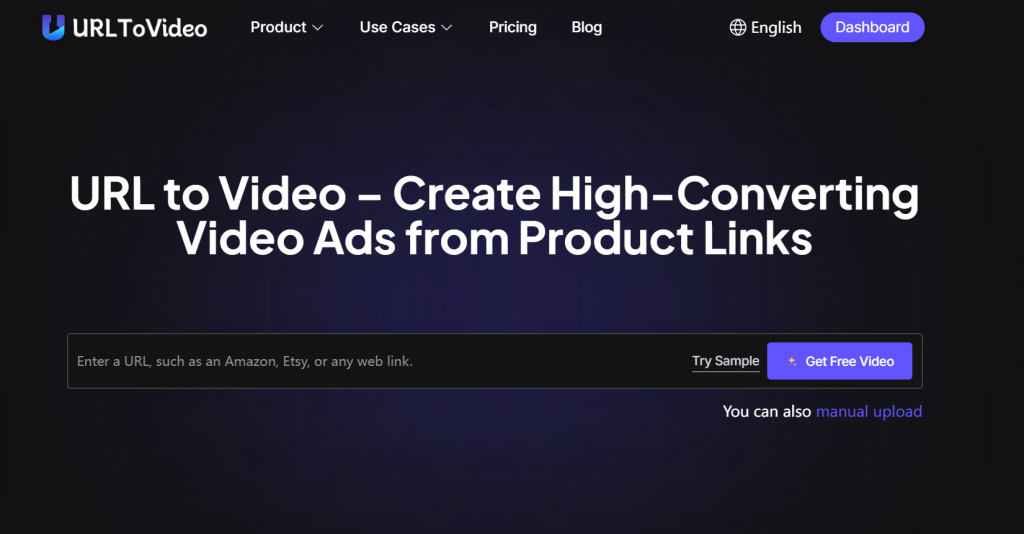
With tools like URLtoVideo, you simply paste your product link, and the system automatically turns your listing content into a ready-to-use video. This allows you to create professional-looking videos in minutes, without any filming, editing, or technical skills required.
FAQ
Do Etsy Listing Videos Have Sound?
No. Etsy listing videos are muted by default on Etsy, and audio is not supported for playback.
How Long Can Etsy Listing Videos Be?
Etsy listing videos on Etsy should be 3 to 15 seconds long.
What is the maximum Video Size for Etsy Listing?
The maximum video file size for listing videos on Etsy is 100 MB.
Does Etsy Prioritize Listings with Videos?
Yes, but only indirectly. On Etsy, listings with videos are not explicitly “boosted” just because they have a video. However, videos can improve key performance signals that do affect ranking, such as click-through rate, engagement, and conversion rate. These behavioral signals are part of Etsy’s search algorithm and can help listings rank higher over time.
What is the Etsy video size in Canva?
The recommended Etsy listing video size is 1920 × 1080 px (16:9 aspect ratio). In Canva, you should create a “Video (1920 × 1080)” design format to match this size, which ensures your video displays correctly on Etsy and looks sharp on both desktop and mobile.
Do Etsy listings with videos get more views?
Yes. Listings with videos on Etsy often get more views because they increase click-through rates and engagement, which can help them perform better in search results over time.
Does Etsy promote listings with videos?
No. Listings with videos on Etsy are not directly promoted or boosted in rankings just because they have a video. However, videos can improve engagement (clicks, watch time, conversion rate), which are key signals Etsy’s algorithm uses, so they can indirectly help listings perform better in search results over time.
Final Words
Etsy listing videos are a simple but powerful way to make your products more engaging, trustworthy, and conversion-friendly on Etsy. When done correctly, they help shoppers understand your product faster and make buying decisions with more confidence.
You don’t need complex equipment or advanced editing skills to get started. Focus on clarity, keep your videos short, and highlight what truly matters about your product. If you want to save time, AI tools can also help you create professional listing videos quickly and at scale.
Start small, test different styles, and keep optimizing. Over time, even small improvements in your videos can lead to noticeable increases in views and sales.