 EN
EN How to Change Your Etsy Shop Name (2026 Step-by-Step Guide)

Are you still struggling with how to change your Etsy shop name? You're in luck — it's simpler than you think, and your listings and reviews stay intact. But there are a few things you need to get right before you hit save.
This guide walks you through the exact steps, the rules to know first, and a free name generator if you're stuck on what to rename it to.
Table of Contents
- Can You Change Your Etsy Shop Name?
- Should You Change Your Etsy Shop Name? (Read This First)
- Etsy Shop Name Rules (2026 Updated)
- Checklist Before You Change Your Etsy Shop Name (Avoid These Mistakes)
- How to Change Your Etsy Shop Name (Step-by-Step)
- Stuck on a Name? Use This Free Etsy Shop Name Generator
- What Happens After You Change Your Etsy Shop Name?
- What Is the Difference Between Username, Shop Name, and Preferred Name on Etsy?
- Will You Lose Traffic or Sales After Changing Your Shop Name?
- How to Actually Choose a Good Etsy Shop Name
- FAQs
- Can I reuse my old Etsy shop name after changing it?
- How to change your shop name on Etsy?
- How Many Times Can You Change Your Etsy Shop Name?
- Can I change my Etsy shop name on mobile?
- Will changing my Etsy shop name hurt my Etsy rankings?
- Why can't I change my Etsy shop name?
- How long does it take for my new Etsy shop name to update?
- Final Verdict
Can You Change Your Etsy Shop Name?
Yes — changing your Etsy shop name is quick and easy. Just follow these simple steps: go to Shop Manager → Settings → Info & Appearance, enter your new name, and save. The change takes effect immediately, and your shop URL updates automatically.
Should You Change Your Etsy Shop Name? (Read This First)
Most people reading this have already made up their mind — and that's fine. But there are two situations worth pausing on before you proceed.
| Feature | What to do |
| Your name no longer reflects what you sell | Go |
| You're rebranding and want consistency across platforms | Go |
| Your name is hard to spell, remember, or search | Go |
| —— | —— |
| You have significant repeat customers who know your current name | Wait |
| Your shop name appears in your top-performing listing keywords | Wait |
Either way — you get up to 5 name changes total, so don't treat this as permanent.
Etsy Shop Name Rules (2026 Updated)
Before you type anything, read these rules. Most failed name changes happen here, not in the settings.
- Character limits: Your shop name must be between 4 and 20 characters.
- Letters and numbers only: No spaces, hyphens, underscores, or special characters.
BlueSkyPrints2024works.Blue Sky Prints!does not. - It must be unique: If another seller is already using a name, you can't have it — even if their shop is inactive or permanently closed. Etsy does not recycle shop names. Once a name is taken, it is permanently unavailable to anyone else.
- Your old name is gone the moment you change it: Etsy marks it as "used" immediately — meaning no one can claim it, and neither can you. If you want it back, your only option is to contact Etsy Support and request a manual restore. That's not guaranteed.
Take a few minutes here. Rushing this step is how sellers end up with a name they regret — again.
Checklist Before You Change Your Etsy Shop Name (Avoid These Mistakes)
Run through this before hitting save:
- Your new name is between 4–20 characters
- No spaces, special characters, or punctuation
- You've confirmed it's available (search Etsy to double-check)
- You're happy enough with it to commit — remember, your old name locks immediately
- You have a list of every place your current shop URL or name appears (social media bios, email signature, link-in-bio tools, business cards)
- You're not mid-campaign — avoid renaming during an active sale or promotion
If all boxes are checked, you're ready.
How to Change Your Etsy Shop Name (Step-by-Step)
Step 1: Go to Shop Manager
Log in to Etsy and click Shop Manager in the top right corner.
Step 2: Open Settings
In the left sidebar, click Settings.
Step 3: Go to Info & Appearance
This is where your shop's basic identity lives — name, icon, banner.
Step 4: Click "Change" next to your shop name
You'll see your current name displayed here. Click Change to edit it.
Step 5: Enter your new name
Type your new name. Etsy checks availability in real time and shows a red message if it's already taken.
Step 6: Save
Scroll down and hit Save Changes. Your name updates immediately.
💡 On mobile: Open the Sell on Etsy app → Manager → Settings → Info & Appearance. The process is identical.
If the name is taken, you can keep testing variations — or use the generator below to instantly find available names that already fit Etsy’s rules.

Stuck on a Name? Use This Free Etsy Shop Name Generator
Most tutorials stop here. They don't tell you what to actually rename it to.
Coming up with a name that's memorable, available, and actually fits your niche is harder than it sounds. Most good names are already taken. Generic ones don't stand out. And the 20-character limit cuts off a lot of ideas before you even start.
If you're stuck, Free Etsy shop name generator from EHunt . Enter a few keywords about your niche and it generates dozens of name ideas instantly — based on your product category and real Etsy naming patterns. Instead of guessing or checking names one by one, you get a shortlist of available options that already fit Etsy's character rules.
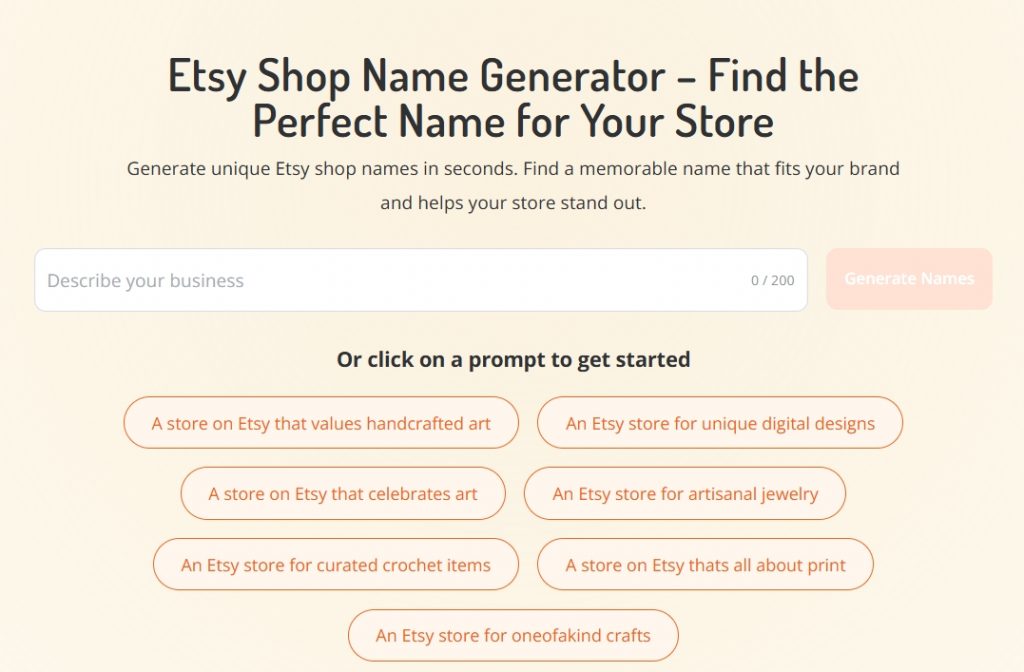
You can also follow this detailed video tutorial about how to choose the perfect Etsy shop name.
What Happens After You Change Your Etsy Shop Name?
Most sellers have the same concerns after renaming. Here's what actually changes — and what doesn't:
- Your URL updates automatically. Your shop moves from
etsy.com/shop/oldnametoetsy.com/shop/newname. Etsy redirects the old URL, so existing bookmarks and shared links won't break. - Your reviews and order history stay intact. All past orders, star ratings, and sales transfer to the new name. Nothing is lost.
- Your listings are unaffected. Products, prices, photos, and descriptions remain exactly as they were.
- Etsy flags your name change for 45 days. After you rename, Etsy displays a small "shop name updated" icon next to your shop name for 45 days — on your profile, listings, and in search results. This helps returning customers recognize it's still the same shop, just with a new name.
- Old customers can still find you. Buyers who favorited your shop are tracked by shop ID, not name — so their saved shops update automatically.
What Is the difference between username, shop name, and preferred name on Etsy?
Etsy uses a few different names, which can be confusing at first. But once you understand how each one works, it's actually pretty straightforward.
Username
Your username is your account ID — it's what you use to log in, and it also shows up on your profile and next to reviews you leave. Once it's set, it can't be changed.
Shop Name
Your shop name is your store's public identity — it's what buyers see when they visit your shop or come across your products. This is also the name that appears in your shop URL, and the one you can update if needed.
Preferred Name
Your preferred name is simply how you appear on your profile. It's more like a personal display name (nickname or real name), and it doesn't affect your shop or branding. You can change it anytime.
In simple terms:
- Username = your Etsy account ID
- Shop name = your store's brand name
- Preferred name = how you present yourself personally
Will You Lose Traffic or Sales After Changing Your Shop Name?
The short answer: probably a small dip, but nothing permanent.
Etsy internal search: Your rankings inside Etsy are not directly tied to your shop name. As long as your listing titles, tags, and descriptions stay the same, your visibility in Etsy search won't drop.
Google and external traffic: This is where a temporary dip is more likely. Google needs time to re-index your new URL — usually anywhere from a few days to a couple of weeks. Etsy's redirect helps, but it's not instant.
What you can do to minimize disruption:
- Update your social media bios and link-in-bio tools immediately after renaming
- If you have an email list, send a quick "we've rebranded" note
- Don't rename during peak selling season (Q4, major holidays) if external traffic matters to you
Most sellers report no noticeable long-term impact. The temporary dip, if any, is usually gone within 2–4 weeks.
How to Actually Choose a Good Etsy Shop Name
A good Etsy shop name does three things: it's easy to remember, it signals what you sell, and it's available. Here's a framework that works:
| Formula | Structure | Best For | Examples |
|---|---|---|---|
| Niche + Descriptor | What you sell + a quality or feeling | Most shop types | CedarAndCraft, SoftDayStudio, WildRootPrints |
| Your Name + Category | Personal name + product type | Custom / handmade where the maker is the brand | MillerMadeGoods, EllaKnitsShop |
| Made-up word or mashup | Invented or blended word | Sellers who want something totally unique | Paperly, Inkavo, Wovence |
What to avoid
| ❌ Avoid | Why |
|---|---|
| Too generic | Invisible in search — HandmadeShop, CraftyStore could be anyone |
| Trend-based | Ages badly — what's catchy now sounds dated in two years |
| Hard to spell aloud | Say it out loud, ask someone to spell it back — if they hesitate, it's too complicated |
| Copyright or trademark violations | Using protected names (e.g. cartoon characters, brand names) can get your shop flagged or even suspended |
FAQs
Can I reuse my old Etsy shop name after changing it?
Not directly. Once you change away from a name, Etsy marks it as "used" and blocks you from selecting it again through the name tool. You can contact Etsy Support and request a manual restore — this is possible but not guaranteed. If you closed a shop and want to reopen it, the original name stays linked to your account and can be reused.
How to change your shop name on Etsy?
Go to Shop Manager → Settings → Info & Appearance, then click Change next to your shop name. Enter your new name and save — the update takes effect immediately, and your shop URL will be updated automatically.
How many times can I change my Etsy shop name?
Up to 5 times through Shop Manager. After that, you'll need to contact Etsy Support for a manual review — approval isn't guaranteed. Rebrands and business pivots are typically approved more readily than simple preference changes.
Can I change my Etsy shop name on mobile?
Yes. Open the Sell on Etsy app, go to Manager → Settings → Info & Appearance, and you'll find the shop name field there. The process is identical to desktop.
Will changing my Etsy shop name hurt my Etsy rankings?
Not permanently. There may be a short-term dip while search engines re-index your new URL, but your Etsy internal rankings are not directly affected. Keep your listing keywords and tags consistent to minimize any disruption.
Why can't I change my Etsy shop name?
A few common reasons: the name is already taken (even by a closed shop), it doesn't meet the character rules (4–20 characters, no spaces or special characters), or you've hit your 5-change limit. If none of those apply, try clearing your browser cache or switching browsers — occasionally it's a display glitch.
How long does it take for my new Etsy shop name to update?
The change is instant inside Etsy — your listings, profile, and shop page update immediately. Google and other search engines may take a few days to a couple of weeks to reflect the new URL in their results.
Final Verdict
Changing your Etsy shop name is easier than you might think. Follow the steps above, keep the character rules in mind, and the update goes live instantly — your listings, reviews, and shop URL all carry over automatically.
The harder part is landing on the right name. A great shop name doesn't just identify you — it sticks, it fits your niche, and it gives buyers an instant sense of what you're about. That's the difference between a name someone remembers and one they scroll past.
That's exactly what EHunt's free Etsy shop name generator is built for. Enter a few keywords about your shop, and it generates dozens of available ideas — already checked against Etsy's naming rules, already filtered for what's taken. No guessing, no checking one by one.
Most sellers find a name they love in under five minutes.
→ Try EHunt's free Etsy Shop Name Generator and find yours today.